
All project documents in one place. Always the latest version.
Hustro CDE (Common Data Environment) gives construction teams a single source of truth for all project documentation — drawings, approvals, specifications and records. Share, comment and update documents from any device, in real time. No more outdated versions, no more version conflicts, no more searching through email attachments.

What construction teams struggle with
every day
APPROVAL BOTTLENECKS
"Document approvals take weeks — and the whole project waits"
Verification and sign-off by multiple stakeholders drags on for weeks, blocking project progress. Every bottleneck in the approval workflow costs time and money — and nobody knows where the document is stuck.
VERSION CHAOS
"Which version is current? Nobody knows for sure"
Teams lose 30–40% of productive time searching for the latest version of a drawing or specification. Contractors working from outdated documents make mistakes that are expensive to fix — and even harder to dispute.
ACCESS PROBLEMS
"Does everyone on site have access to the current documentation?"
Restricted permissions, multiple systems and no central repository mean critical information is unavailable exactly when it's needed most — on site, in a basement, without good signal.
Companies that manage documents with Hustro

Performance that lets us make decisions based on always up-to-date data
Managing documentation, defects and inspections across 7 simultaneous projects

The app's mobility means I can use it both in the office and on the construction site
You can work efficiently because up-to-date documents are always within reach!
Key CDE processes for construction document management
Our CDE environment gives all project participants full control over document workflows - with clear permissions, version control and a complete audit trail.
Design change requests
Centralised management of design change requests with an automatic approval workflow. Every request includes justification, cost and schedule impact, and is linked to specific documents and model elements.
Material submittal approvals
Submit material data sheets for approval with commenting, revision history and a full audit trail - compliant with CDE standards. Every approval is timestamped and linked to the relevant specification section.
RFI management
A central place for contractor questions and designer responses — linked to the relevant drawings or model elements. Every RFI is tracked from submission to closure, with a full history accessible to all authorised parties.
Inspection and handover protocols
Digital inspection and technical handover protocols with photo attachments, comments and links to specific building elements. The system automatically generates reports showing inspection status and outstanding items.
See how Hustro manages your project documentation — free demo, no commitment.
Book a demoDocument management works best with these modules
Hustro CDE gives your team a single source of truth for all project documentation – with full version control, access management and automatic synchronisation across every device.
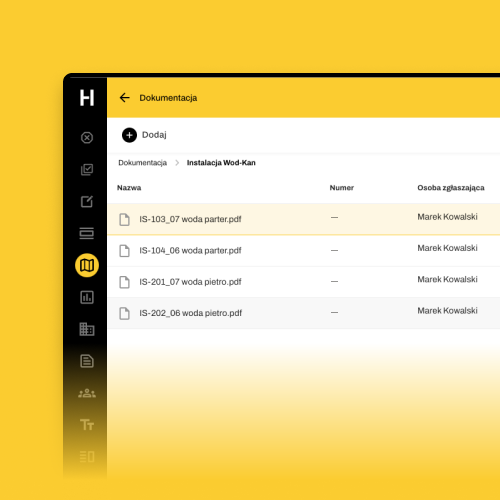
Document organization
Complete freedom in organising files into folders, sorting and searching. Upload new drawing revisions in seconds and share them instantly with your team – everyone always works from the latest approved version. 2TB space per project.
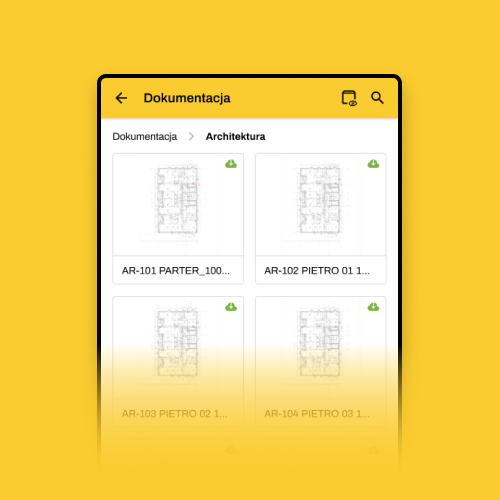
Preview drawings on mobile
Browse full construction drawings on your phone directly on site. When you need to check a detail or verify a specification, the latest version is always at your fingertips – no printing, no carrying paper sets.

Automatic file synchronization
Files uploaded to Hustro synchronise automatically across all devices – desktop, tablet and mobile. Every team member always has access to the current version, wherever they are on site.

Securely stored in Europe
All project documents are stored securely across three independent data centres located in Europe. Your data is protected, backed up and available 24/7 — even if one server goes down.
Frequently asked questions
What is a CDE in construction?
How does Hustro prevent teams from working from outdated drawings?
Does Hustro CDE work offline on construction sites?
Can Hustro manage document approval workflows?
Is Hustro CDE compliant with ISO 19650?
Where is Hustro project data stored?
Can subcontractors and external parties access Hustro documents?
How much does Hustro document management cost?
Manage all project documents
in one place
Book a free demo and see how Hustro CDE gives your team a single source of truth for all drawings, specifications and approvals - with full version control and ISO 19650 compliance.
Book a demo
Our team will get back to you within 24 hours

Tomasz Jones
Digitalisation Specialist