Hustro - Zarządzanie zadaniami

Task Management

Assign tasks, track progress and close every deadline on site

Hustro gives construction teams a single place to assign work to subcontractors, set deadlines and monitor progress in real time. **As a result**, there are no more WhatsApp chains, missed deadlines or end-of-day phone calls.

Linked to floor plans ISO 9001 compliant Works offline
Construction task management software – Hustro
Korzyści - Zarządzanie zadaniami
Benefits

Plan without chaos, deliver without delays.

Daily work on a construction site doesn't have to mean endless phone calls and outdated schedules. With digital task management, every task is planned, assigned and tracked in one place - even offline.

Faster task assignment

Assign tasks to people and areas in seconds - no phone calls, no emails, no WhatsApp messages.

Linked to floor plans

Every task pinned to a specific location on the building plan - zero misunderstandings with site teams about where work needs to happen.

Automatic progress reports

Work progress generated automatically - no transcribing notes, no filling in spreadsheets after a site visit.

Deadline tracking and alerts

Instant alert when a task exceeds its deadline - you react before a small delay becomes a schedule problem.

Works offline on site

Tasks and drawings available on mobile without internet - essential for basements, plant rooms and sites with poor signal.

Helicopter view across all sites

Full visibility of progress across all active projects simultaneously - one dashboard, every site, at a glance.

See how Hustro manages tasks across your construction sites — free demo, no commitment.

Book a demo
Blok — Obszarowe planowanie zadań
Task planning

Tasks linked to floor plans and building areas

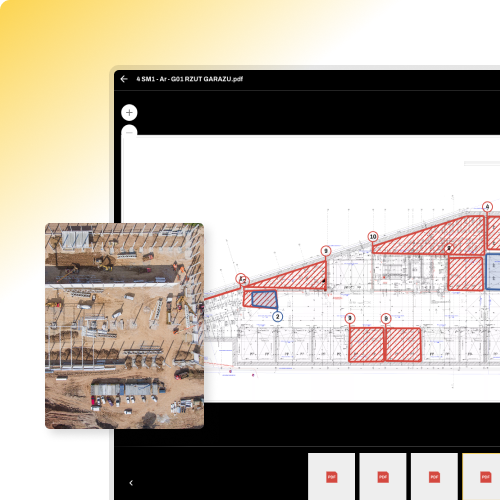
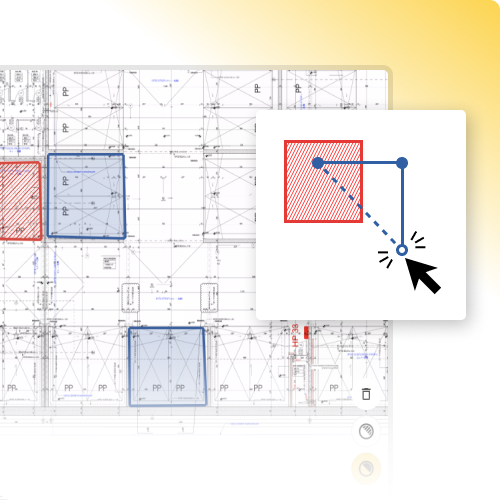
Create tasks linked to a specific area and building drawing. Everyone knows exactly where and what needs to be done - no misunderstandings with site teams, no wasted trips to the wrong location.

  • Link each task to a specific area and drawing
  • Assign work to specific people and teams
  • Set deadlines, priorities and task types
  • See all tasks on the building floor plan at a glance
Construction task management linked to floor plans – Hustro
Blok — Raportowanie postępów prac
Construction progress reporting – Hustro
Progress reporting

Subcontractors report progress directly from their phone

Subcontractors update task progress from mobile - the site manager has a current picture of all works without making a single phone call or sending a single email.

  • Subcontractors report progress directly from mobile
  • Data collected automatically - no manual entry required
  • Summary reports generated in one click
  • PDF export ready to send - no desk work needed
Blok — Śledzenie opóźnień
Monitoring

Real-time progress monitoring across all tasks

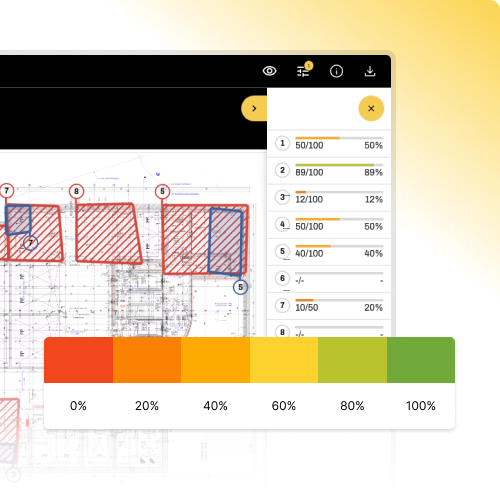
A live progress chart across all active tasks. Filter by contractor, area or deadline - full control without walking the site or making phone calls.

  • Live task progress view on a real-time chart
  • Filter by contractor, area and deadline
  • Compare planned vs actual progress
  • Export data to summary reports
Construction task progress monitoring – Hustro
Blok — Monitorowanie stanu prac
Construction deadline tracking – Hustro
Schedule

Deadline tracking and delay alerts

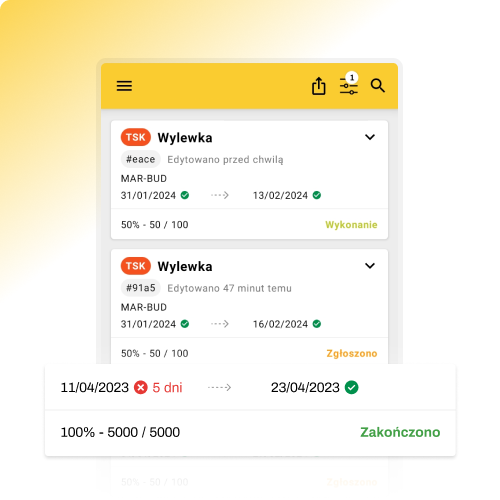
Automatic alerts when a task exceeds its planned deadline. Quickly identify the cause and take corrective action before a small delay becomes a schedule problem for the whole project.

  • Automatic alert when a deadline is exceeded
  • View of overdue tasks with cause and responsible person
  • Compare planned vs actual progress
  • Full history of changes and deadline shifts
Testimonials

Companies that manage tasks with Hustro

Constrim

Reports in minutes - everything in one place

Before Hustro, I had to start every summary almost from scratch - dozens of phone calls, emails, Excel files from different site managers. Now I open the app and see everything in one place. I generate reports in minutes, always in the same format, always complete.
Katarzyna Fiedoruk
Representative – Constrim Sp. z o.o.
Read the full story
Baumatech

Subcontractor communication at a new level

We've seen a noticeable improvement in communication with subcontractors - the system enables faster and more effective information exchange, which translates into better work organisation on site. The app is used across four of our residential developments during both execution and handover phases.
Rafał Kawczak
President of the Board – Baumatech Sp. z o.o.
Read the full story
Mesta Development

Every task goes automatically to the right contractor

We use the app primarily to communicate with contractors - every task goes automatically to the right company with a description, photos and location. Contractors know exactly what to do, everything is documented in one place and we track progress in real time.
Paweł Trzesicki
Investment Director – MESTA Development
Read the full story
FAQ — Zarządzanie zadaniami
FAQ

Frequently asked questions

What is construction task management software?

Construction task management software allows site managers to assign work to subcontractors, set deadlines and track progress in real time — replacing WhatsApp messages, phone calls and Excel spreadsheets. Every task is linked to a responsible person, a location on a floor plan and a deadline, creating a clear and auditable record of all works on site.

Can tasks be linked to floor plans and building drawings?

Yes. In Hustro, every task can be pinned to a specific area on a building floor plan. Contractors see exactly where work needs to be done — no misunderstandings, no wasted site visits to the wrong location. The floor plan view shows all active tasks and their statuses at a glance.

How does Hustro track construction task deadlines?

Every task in Hustro has a deadline assigned at creation. The system sends automatic reminders to the responsible person before the deadline. Overdue tasks are flagged immediately in the dashboard. Managers see all delayed tasks across all sites — with the responsible contractor and cause — without making a single phone call.

Can subcontractors report task progress without a Hustro account?

Yes. Subcontractors can receive task assignments and report progress by email — their reply is automatically linked to the task in Hustro. No account or app installation required. For subcontractors who work regularly on site, free limited accounts are available at no extra cost.

Can I monitor task progress across multiple construction sites at once?

Yes. Hustro gives managers a single dashboard showing all tasks across all active projects — filterable by site, contractor, area, status and deadline. Teams managing 5, 10 or 20 simultaneous projects see everything in one place without switching between systems or consolidating spreadsheets.

Does Hustro task management work offline on construction sites?

Yes. Hustro works fully offline on iOS and Android. Tasks can be viewed, updated and new tasks created without an internet connection — essential for basements, plant rooms and sites with poor signal. All changes sync automatically when connectivity is restored.

How much does Hustro task management cost?

Hustro offers a per-user licence from €28/month (annual contract) covering all modules including task management, defect management, inspections, H&S and document management. Per-project licence available from €670/month for up to 100 users. Enterprise pricing available on request.
CTA - Zarządzanie zadaniami
Try for free

Start managing construction tasks
without the chaos

Book a free demo and see how Hustro helps you plan, assign and track tasks across your construction sites - from mobile, in real time, without phone calls or spreadsheets.

Tasks linked to floor plans
Every task pinned to a specific location on the building plan - no misunderstandings
Automatic deadline tracking and alerts
Instant alert when a task exceeds its deadline - react before the delay grows
Progress reports without manual data collection
Work progress generated automatically - always current, always complete
Live on your first site within 24 hours
No IT project required - our team configures everything on day one

Book a demo

Our team will get back to you within 24 hours

Roksana Sosnowicz

Roksana Sosnowicz

Digitalisation Specialist

Form - Book Demo
Improved Footer