
App for conducting inspections – how to streamline quality control on site

An app for conducting inspections can transform how your team handles quality control on construction sites. According to OSHA guidelines, regular inspections prevent accidents and costly rework. However, traditional methods using Excel and paper waste valuable time. So, how can a mobile app for conducting inspections make your work more effective? Let’s find out.

Why you need an app for conducting inspections
Companies that approach quality and safety professionally prepare detailed plans for each process. These plans consist of one-time and cyclical inspections conducted at specified intervals and stages of work. In fact, construction site inspections are one of the most crucial tools with tangible impact on quality and safety.
Whether you’re controlling a specific aspect of work, inspecting an entire building, or a road section, the goal remains similar: verifying the existing state according to a specified checklist. Currently, teams conduct inspections using pre-prepared checklists based on building regulations, standards, or best practices.
Typically, an expert creates a checklist in Microsoft Excel, which serves as a template during the inspection. After completing the inspection, the engineer prepares a report with the completed checklist and a list of discrepancies. Then, the team corrects identified issues within the specified timeframe.
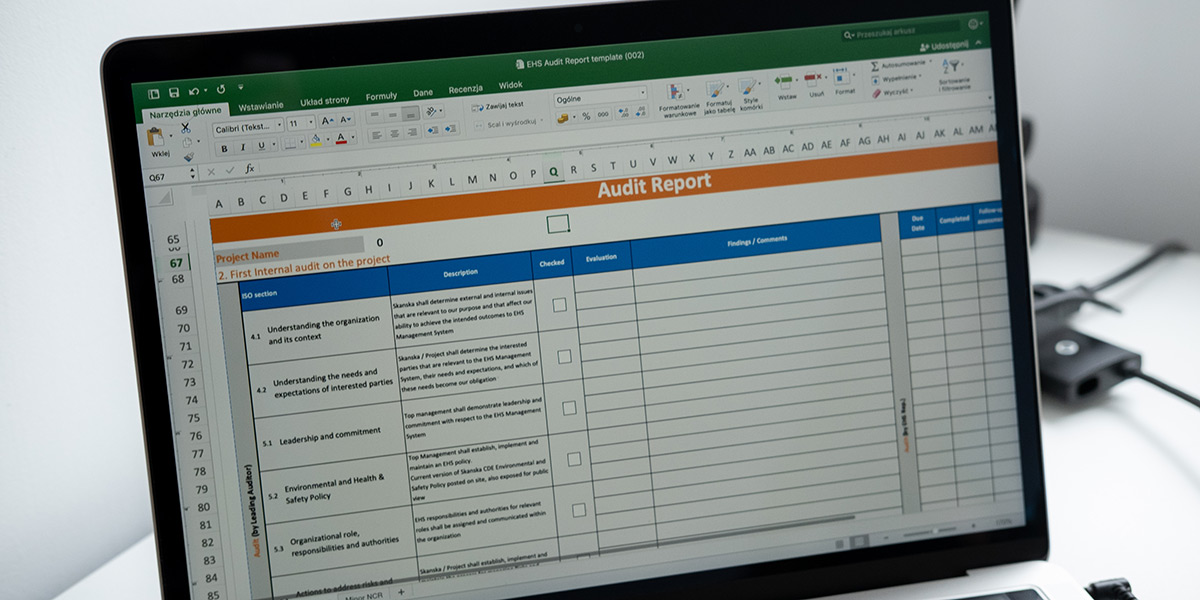
Traditional inspection template in Microsoft Excel
Problems that an app for conducting inspections solves
Going through a checklist might seem simple. However, the reality proves much more complex. Consider these common challenges:
- Template management – with dozens of inspection templates that change during the project, how do you ensure they stay up-to-date and accessible?
- Knowledge transfer – what if a recent graduate conducts the inspection instead of the expert who created the checklist?
- Discrepancy tracking – resolving issues can take days to months, so how do you monitor corrective work progress?
- Work comfort – running around the construction site with a laptop and open Excel sheet is neither convenient nor safe
As a result, inspectors spend more time on administration than on actual quality control. Moreover, document inconsistency leads to significant financial consequences.

Photo by Wesley Tingey on Unsplash
Key features of a good app for conducting inspections
First, you need to ensure template consistency. Prepare all inspection templates according to a specific convention so engineers don’t have to wonder what to enter or mark. Additionally, make templates available in one place for every team member – always at hand on both computer and phone.
Furthermore, add descriptions or references to each template that clearly define requirements for the controlled work area. This practice helps young engineers acquire knowledge quickly, prepare in advance, and conduct inspections more confidently.
This simple practice adds significant value: the onboarding process for new employees becomes shorter, and the promotion of company practices proceeds much faster.
Hustro – the best app for conducting inspections on construction sites
When inspectors report discrepancies during traditional inspections, they typically note them “somewhere nearby” – switching between tools, sheets, phones, and computers. Undoubtedly, this complicates the entire process.
In contrast, the Hustro mobile application allows you to quickly register discrepancies without leaving the inspection context. Simultaneously, the system links each reported discrepancy to a specific controlled element and the entire inspection. Consequently, you can monitor discrepancy status in real-time without dedicating additional time to it.
How much you’ll save with an app for conducting inspections
Based on statistical data and interviews with companies using Hustro, we can present concrete savings. Let’s compare inspection costs:
Inspection Costs
| Process | Traditional way | With Hustro |
|---|---|---|
| Average inspection time | 3 h | 1.5 h |
| Inspections per month | 8 | 8 |
| Time on inspections | 24 h | 12 h |
| Report preparation time | 4 h | 0.1 h |
| Total monthly time | 28 h | 12.1 h |
| Hourly rate (€) | €30 | €30 |
| Total monthly cost | €840 | €363 |
| Monthly savings | €477 | |
| Speed improvement | 2.3x faster |
New Inspector Onboarding Costs
| Process | Traditional way | With Hustro |
|---|---|---|
| Supervisor time per month | 20 h | 5 h |
| Hourly rate (€) | €30 | €30 |
| Onboarding period | 3 months | 3 months |
| Total onboarding cost | €1,800 | €450 |
| Savings per new hire | €1,350 | |
| Efficiency increase | 300% |
€477
monthly savings
on inspections
€1,350
saved per
new hire
57%
less time
per month
2.3x
faster
inspections
Key benefits of using an app for conducting inspections
- 57% less time monthly – from 28h to just 12.1h on inspections
- €477 monthly savings – on inspection costs alone
- €1,350 saved per new hire – faster onboarding with self-service templates
- Real-time tracking – monitor discrepancy status without extra effort
- Consistent documentation – all templates up-to-date and accessible
Ready to try the best app for conducting inspections?
Introducing an app for conducting inspections brings significant savings even on small projects with just 3 engineers. The benefits include both quantifiable savings and non-quantifiable improvements like work comfort and document consistency. In conclusion, is it worth delaying the switch to a modern app for conducting inspections? That’s a question every construction manager should answer for themselves.
Ready to streamline your inspections?
See how Hustro can make your inspections 2.3x faster.
Explore all modules
Inspections are just one of Hustro’s modules. Discover the full capabilities – from defect management to construction site analytics.
See Defect Management module