
Service department
Service department software – warranty claims, repairs and technician management
All warranty and service reports from every investment in one list. Assign technicians, track repair deadlines and keep the full history of every claim – from arrival to resolution.
Trusted by: AWM Budownictwo, Hermes Fulfilment, Asbud Group, Hybryd16

For the whole service team
Managers, technicians and claimants work from one issue list
Warranty service means dozens of cases at once: defects from residents and property managers, statutory deadlines, technicians and subcontractors. Hustro organises them in one place.

01
Service managers and coordinators
- Reports from all investments in one view
- Priorities and repair deadlines under control
- Reports for the investor or board in a few clicks

02
Technicians and subcontractors
- Task list on mobile – with location and photos
- Status update and completion photo on site
- Works offline in basements and plant rooms

03
Residents, tenants and property managers
- Report via web form or QR code – no login
- Photo and description in seconds
- Updates on repair progress
Service department challenges
When service requests come from everywhere, something always falls through the cracks
Late reports
You hear about problems too late
Defects reported by phone, email or text – often days after the fact. You are always reacting, and the warranty clock is already ticking.
Multiple sites
Several investments at once means something gets missed
Each investment has its own spreadsheet, email thread and WhatsApp group. There is no single place to see what is open and overdue.
Penalties
A penalty for a missed repair deadline
Statutory deadlines are easy to miss when tracked manually. One overlooked defect can cost more than a year’s licence – and the client relationship.
Technicians
Half a day on the phone to technicians
Without a system, scheduling is done from memory. Tasks get duplicated or forgotten, and you find out when the client complains.
Documentation
No evidence in a dispute with the investor
When was the defect reported, when was it fixed, who confirmed it? Without a claim history it is hard to defend against a claim.
Inspections
Equipment inspections in one person’s calendar
One person tracks installation and equipment inspections. When they are on holiday, deadlines slip.
From a resident’s report
to a closed repair.
One app for warranty and service work across all your investments.
How Hustro works
The whole service claim lifecycle in one tool
01ReportA resident or property manager reports a defect in 30 seconds
Through a web form, QR code or the app: photo, description and location. Claimants need no account, and the report lands straight on the service list.
02ClassificationThe service manager assesses the claim and sets a priority
You mark whether it is a warranty defect or user damage, set a deadline and assign a technician or subcontractor.
03RepairTechnicians work from their phone – offline too
The technician sees the task with location, photos and documents, updates the status and adds a completion photo. Subcontractors can reply by email, with no account.
04Sign-offVerifying the repair and closing the claim
You approve the repair based on photos or an on-site check, and the claimant is informed that the case is closed.
05History and reportsFull history of every claim and reports
Every claim is timestamped from arrival to closure. A report for the investor or board takes a few clicks.

One claim from A to Z
See how a defect moves through Hustro
From a photo a resident sends in the evening to the investor’s report – with no calls, emails or spreadsheets along the way.
A resident reports a defect
Web form or QR code, photo and description – no account, no app.
The report lands on the list
Instantly, with location, priority and repair deadline.
Leak under the sink
The manager assigns a technician
In one click. The status changes to “In progress”.
The technician completes the repair
An “after” photo and a note from site – offline too.
email · 10:21
status · 10:21
Everyone knows the case is closed
The resident is informed, and the manager sees the deadline was met.
A report with no retyping
Claims, deadlines and photos from the whole month in one PDF.
Modules
All service department processes in one system
Reports, technician tasks, inspections and documents are managed in the same place – with a full history.
Features
4 features that replace spreadsheets, email chains and phone calls
They give your service team full control over every report, repair and deadline.
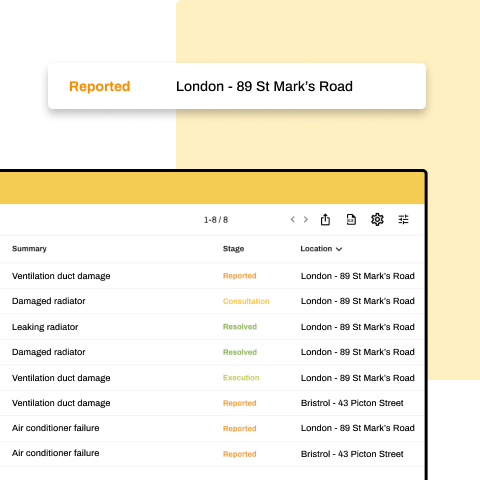
1Central registry of claims
Every report from every investment in one list – with status, priority, location and assigned technician. Filter by site, contractor or deadline.
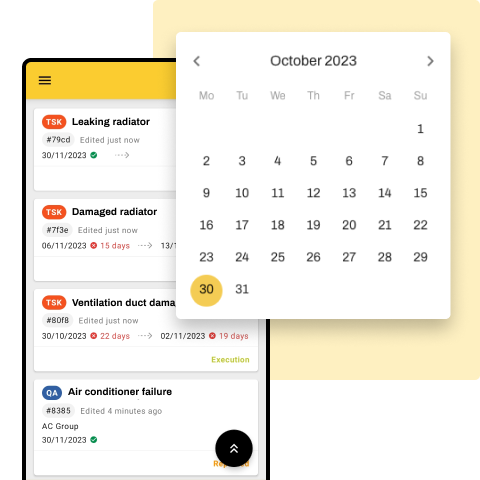
2Technician scheduling
Assign tasks based on priority, location and availability. Hustro tracks every deadline and flags tasks that are about to become overdue.
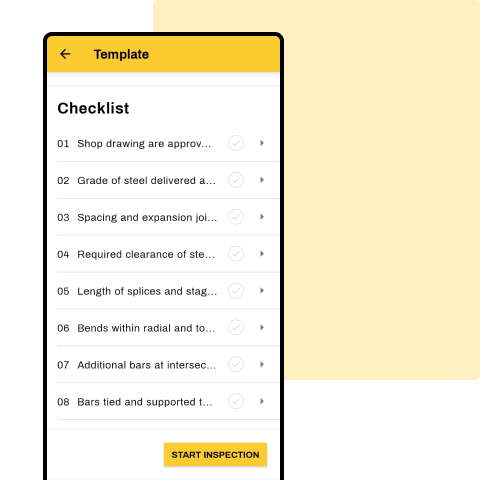
3Equipment and inspection register
Devices and installations with service history, inspection dates and documentation. Set recurring inspections once.
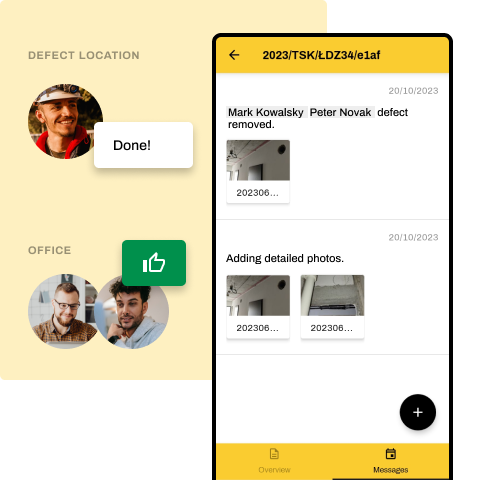
4Communication linked to the report
Every message, photo and status change stays with the report – not in a WhatsApp thread. A full audit trail in case of a dispute.
Use cases
Who uses Hustro for service work
From a single estate to dozens of investments under warranty – each investment has its own space with reports, documents and team.
Property developers
After-sales and warranty departments – reports from residents after unit handovers.
General contractors
Warranty service on completed investments – deadlines and evidence of repairs.
Installation companies
Installation and equipment service, recurring inspections and technician call-outs.
Property managers
Tenant reports and facility service across many locations.
Case studies
Case studies: service and warranty work
Service departments, tenant defect handling and installation service – see how they work with Hustro.

Hermes Fulfilment: building and maintaining a logistics centre
Hermes uses Hustro both during construction and in the day-to-day operation of its centre – for defect reporting and facility service.
“The platform has also become an invaluable tool in the day-to-day servicing of the facility, helping our team maintain a high standard of the building.”
 Tomasz KlimczakManaging Director, Hermes Fulfilment





Why Hustro
Benefits for service departments
Hustro organises warranty and service work so technicians fix defects instead of looking for information.
Book a demoTime and cost savings
Fewer calls and less retyping – the team fixes defects instead of chasing information.
Protection from penalties
A deadline on every report and reminders before it passes. Less risk of penalties for late repairs.
Evidence in a dispute
Every claim is timestamped from arrival to closure, with photos and a communication history.
Many investments, one system
Each investment has its own space, and one view shows all deadlines.
More efficient technicians
Clear priorities and a task list on mobile – no duplicated work or wasted trips.
Happier clients
Claimants know what is happening with their case, and repairs are faster.
All investments.
One view.
Reports, deadlines and technician work across your whole portfolio – in real time.
Implementation
Implementation – as easy as 1-2-3
STEP 1
Free demo and consultation
- Analysis of your needs
- Presentation of the app’s capabilities
- Answers to all your questions
STEP 2
14-day unlimited trial
- We configure your investments and report categories
- We train your team
- Full technical support
STEP 3
Decision
- You see concrete results
- You compare before and after
- You sign the contract – or say thank you
Knowledge
Read more about warranty and service management
FAQ
Frequently asked questions
What is service department software?
It is a digital platform that lets service teams receive warranty and maintenance reports from multiple properties or investments, assign them to technicians, track repair deadlines and document completed work – replacing scattered emails, phone calls and paper forms with a single mobile system.
How does Hustro help avoid penalties for late repairs?
Every report has a repair deadline. Before it passes, the responsible technician and their manager receive a reminder. Every report is timestamped from arrival to closure, giving the service department evidence in disputes with investors or residents.
Can I manage reports from multiple investments at once?
Yes. Service managers see all reports across all investments in one view, filterable by property, priority, technician or deadline. Technicians see only the tasks assigned to them.
How do claimants submit reports?
Residents, tenants and property managers submit reports through a web form or QR code – no app and no account required. The service department classifies each claim (warranty defect or user damage) and assigns it.
Can Hustro manage equipment registers and inspections?
Yes. Hustro includes a register of devices, installations and systems with service history, inspection dates and documentation. Recurring inspections are set up once, and Hustro sends reminders before each one is due.
Does Hustro work offline?
Yes. Hustro works offline on iOS and Android. Technicians can view tasks, update statuses and add photos without a connection – in basements and plant rooms. Data syncs automatically when the connection is back.
Do subcontractors need a Hustro account?
No. Subcontractors receive tasks by email and can respond without an account – their reply is linked to the task automatically. For external technicians who work regularly, free limited accounts are available.
How long does implementation take?
A consultant configures report categories, technician accounts and the equipment register, and teams typically get up to speed within a single shift. You start with a 14-day unlimited trial.
How much does Hustro cost for a service department?
The per-user licence starts from €28/month on an annual contract and covers all modules. For large investments with many technicians and subcontractors, a per-project licence is available. See pricing for details.
Is my data secure and GDPR compliant?
Yes. Data is encrypted in transit and at rest, and servers are located in the EU. The system is GDPR compliant and lets you manage permissions precisely.
Try Hustro on your project
Our consultants will help you plan the rollout and train your team. We will show you how service and warranty departments work with Hustro.
Book a demo
Our team will contact you within 24h

Tomasz Jones
Digitalisation Specialist