
SOFTWARE FOR DEVELOPERS
Construction Management Software for Property Developers
Managing a residential development and spending more time firefighting than actually managing? Hustro is software built for developers that brings inspections, defects, and documentation together in one place — accessible from the office and the construction site.

You're managing a property development.
Do any of these sound familiar?
DOCUMENTATION
Project documentation scattered across drives and inboxes
Who has the latest version of the drawings? The contractor claims they never received the revision. And the same conflicts keep coming back — over time, costs, and responsibility.
CONTRACTORS
You have no idea what the contractor is actually doing right now
To find out where things stand, you have to call. The contractor will "be there tomorrow". The problem comes back a week later — and you're starting from scratch again.
REPORTING
Every board report means hours in Excel
You pull data from emails, spreadsheets, and notes. The result: a report that's already 3 days out of date by the time it reaches the board meeting.
HANDOVERS
Handovers take entire days, and you write up the reports in the evening
The inspector scribbles notes on paper, photos sit on a phone, the report ends up in Word. One handover means hours of desk work — before you can send anything to the contractor.
WARRANTY SERVICE
Warranty defects come in from every direction at once
Email, phone, WhatsApp, website form. A resident calls asking for an update, and you don't know where their case stands.
RESIDENT RELATIONS
Residents are unhappy and leaving negative reviews
When communication is chaotic, residents experience it as a lack of respect. And an online review stays there for years — affecting sales on your next development.
See what those who already
use Hustro have to say

Thanks to Hustro, I can increase my team's efficiency...

We wholeheartedly recommend this application...

We were also looking for a tool to improve communication with contractors...

Hustro gives us a complete overview of what's happening on the development...

The system proved to be a key tool in delivering our developments...
One tool that covers the entire project lifecycle
-
01Handovers Handovers based on standardised checklistsYour team conducts handovers using ready-made templates. Every non-conformance is logged on the flat's floor plan with a photo — in under 30 seconds. The report is generated automatically, with no need to sit down at a computer after leaving the site.
-
02Warranty service Centralised defect and warranty service managementResidents submit defects through a dedicated online form. The request is automatically routed to a coordinator, assigned to a contractor, and tracked through to resolution. No lost cases — a full history of every complaint in one place.
-
03Work status Full visibility of work status in real timeInstead of calling the contractor — you check the app. You can see what's been completed, what's delayed, and where the problem is. The data is always current, because it's updated by the team directly on site.
-
04Reporting Automatic reports for management and investorsProgress reports, defect summaries, handover history — available in just a few clicks. No more hours spent in Excel before a board meeting. Data is always up to date, because it comes directly from the site.

Try for free
Book a demoHow do Polish property developers work with Hustro?


Process automation
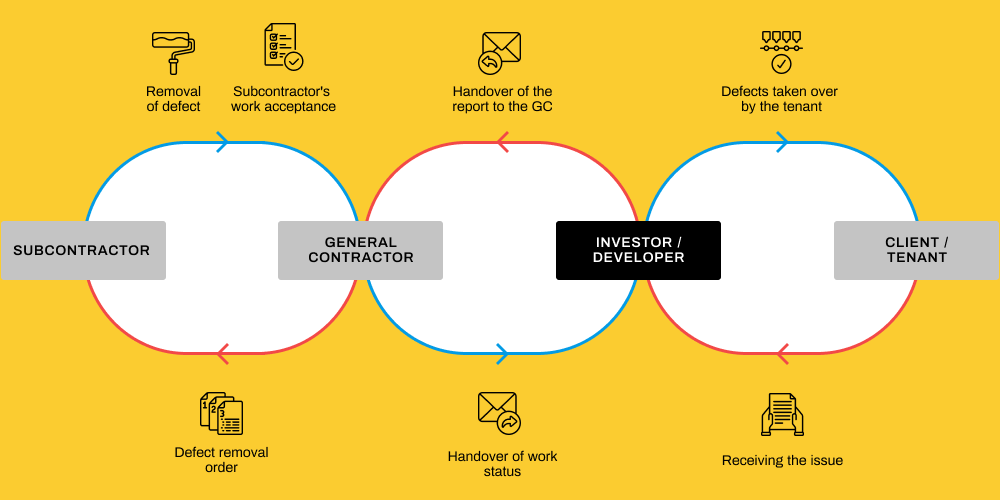
Conducting handovers with the general contractor
Efficient collaboration with both the contractor and subcontractors, using ready-made templates.
Project documentation management (CDE Platform)
Centralise all project documentation in one secure environment. Share, review, and approve drawings, specifications, and reports in real time – fully compliant with ISO 19650.
Defect management during construction
Instant defect reporting and precise communication between all parties involved. Regardless of how you communicate with contractors, the app helps keep information organised and ensures agreed deadlines are met.
Conducting resident handovers
Streamlining the process from the first contact with residents through to the final verification of repairs. Instant defect reporting, deadline setting, and progress monitoring.
6 modules that make a real difference
These features provide real solutions to your challenges, effectively automating your work and enabling you and your team to achieve greater productivity.
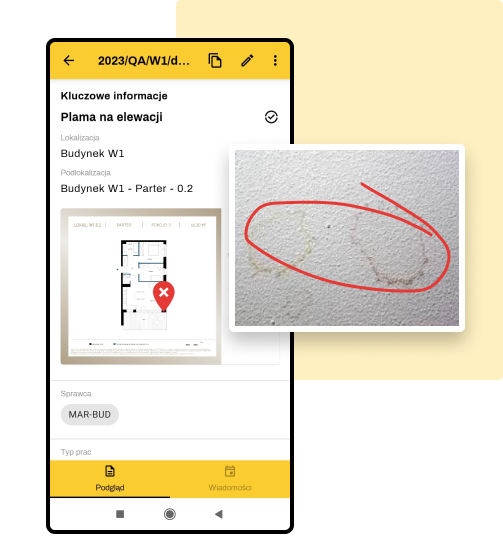
Defect logging
Fast and precise defect logging takes less than 30 seconds, reducing the time to resolution. This delivers not only time savings, but also greater overall efficiency and reliability across our processes.
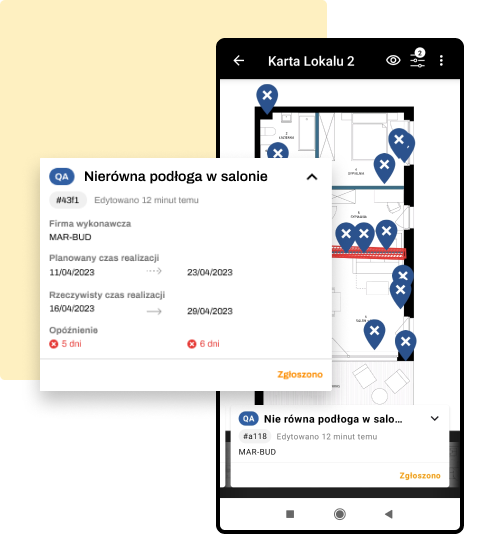
Use of unit cards
Working with unit cards speeds up handover and defect management. Unit cards not only reduce response times for defects and issues, but also make it easier to closely coordinate the teams responsible for resolving them.

Checklist-based inspections
Working with unit cards speeds up handover and defect management. Unit cards not only reduce response times for defects and issues, but also make it easier to closely coordinate the teams responsible for resolving them.
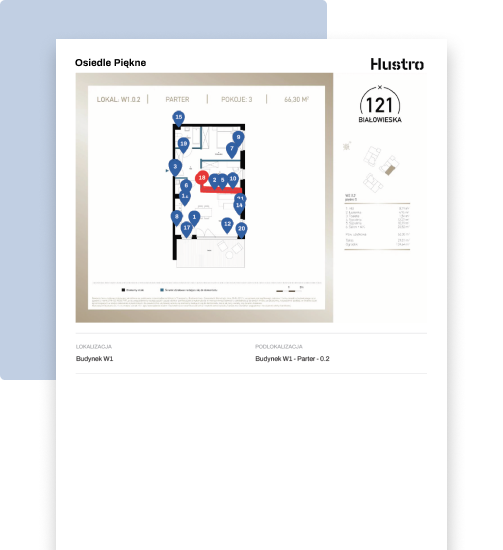
Conducting handovers with the general contractor
Preparing handover reports can be much simpler and faster. With the report generation feature, you can tailor the report to your needs and audience in just a few clicks.
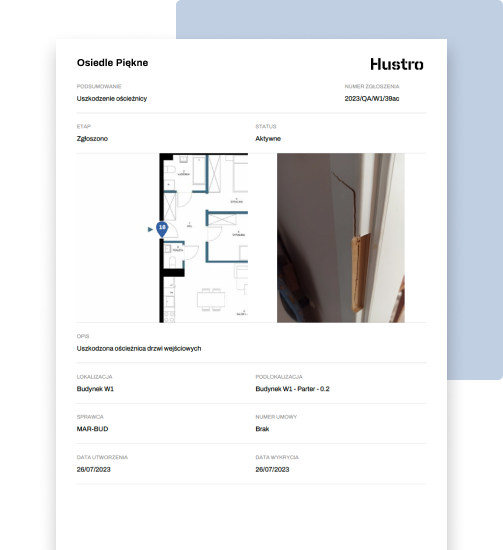
Defect report as an attachment to the handover record
Post-handover documentation should be prepared quickly and clearly. Transparent communication with the resident will have a positive impact on the relationship between both parties.

Work completion statuses
Post-handover documentation should be prepared quickly and clearly. Transparent communication with the resident will have a positive impact on the relationship between both parties.
What does work look like before and after implementing Hustro?
Their own notes, their own formats, their own interpretations. No standardised process — no consistency across the team.
To find out what's happening on site, you have to call the contractor. Information is scattered across emails, WhatsApp, and notebooks.
You gather data from multiple sources, format the table, send it — and it's already out of date. You repeat this every week.
A resident sent an email, someone read it, someone else was supposed to reply — and nobody knows who's responsible for the case.
Who has the latest version of the drawings? The contractor claims they never received the revision. Disputes, delays, costs.
One format, one system, one standard — regardless of which inspector is conducting the handover.
You check your phone instead of making calls. You can see what's done, what's delayed, and where the problem is — in real time.
The data is already in the system — a report is generated with one click. Always up to date, always ready before the meeting.
Every request has an owner, a status, and a communication history. No lost cases, full transparency for the resident.
One source of truth in the cloud. Everyone has access to the latest drawings and documents — on site and in the office.
Frequently asked questions
How is Hustro different from a regular Excel spreadsheet for defect management?
How does Hustro support resident handovers for a property developer?
Does Hustro integrate with systems used by general contractors?
How long does it take to implement Hustro in a property development company?
Does Hustro handle both technical and resident handovers?
Which property development companies use Hustro?
Does the software work without an internet connection?
How does Hustro help manage warranty claims from residents?
What is Hustro and who is it for?
How quickly can Hustro be implemented?
Does Hustro work on a phone without internet?
What is the H&S module in Hustro?
Is Hustro a CDE platform?
How does quality management work in Hustro?
Do subcontractors need a Hustro account?
How does the service and warranty module work?
Speed up the work
in your company
Book a free demo and see how Hustro can streamline the management of your construction projects.
Book a demo
Our team will get back to you within 24 hours

Tomasz Jones
Digitalisation Specialist