
Defect & Issue Management
Register defects in 30 seconds. Track every issue to resolution.
Hustro replaces paper forms, Excel and WhatsApp with a single mobile platform for defect management. Log defects with photos pinned to floor plans, assign them to subcontractors and track resolution deadlines in real time — online and offline.

Register, assign and close defects — without the chaos.
Construction site work doesn't have to mean stacks of paper and hours spent searching for information. With digital defect management, every issue is registered, assigned and tracked in real time - even offline.
Registered in 30 seconds
Photo, voice description and location on a floor plan - no paper forms, no end-of-day data entry.
Automatic PDF reports
A defect report or full summary is generated in one click - no transcribing notes, no desk work after a site visit.
Faster repairs
The defect goes directly to the responsible subcontractor - no phone calls, no email chains, no delays.
Full defect history
Every status change, comment and photo is saved - complete documentation in one place, permanently searchable.
Higher defect detection rate
Digital inspections and checklists help catch more defects earlier - before they become costly problems at handover.
Transparent communication
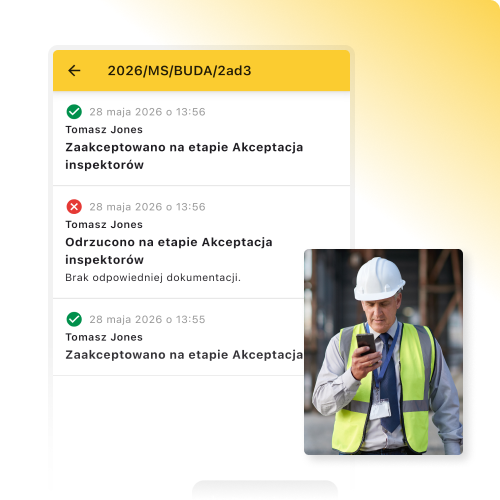
All comments, updates and subcontractor responses in one thread linked to the defect - no more searching through emails and WhatsApp.
See how Hustro manages defects on your construction site - free demo, no commitment.
Book a demoDefect management at every stage of construction
-
01Stage one
Structural works
Cracks, deviations, installation inaccuracies, non-conformances with documentation and H&S defects. Every issue is immediately assigned to the responsible subcontractor with full photo documentation — pinned to the exact location on a floor plan. -
02Stage two
MEP installation works
Installation routing errors, clashes with structure or finishes, non-conformances with drawings. Every defect is tracked from registration to closure — with automatic subcontractor notifications and no lost emails. -
03Stage three
Interior finishing
Aesthetic defects, rework and non-conformances with the design. Hustro links each defect to a specific apartment or unit — so communication with subcontractors is precise, documented and searchable at any time. -
04Stage four
Warranty service
Defect reports from the investor or end user after handover. With a complete defect history and automatic PDF reports, you have full warranty documentation always at hand — ready for any inspection or dispute.

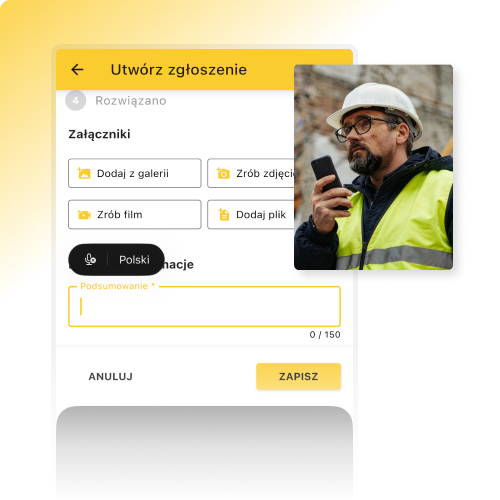
Register a defect in under 30 seconds
Photo, voice note and location — defect registered instantly, on site, without waiting until you're back at a desk. Every issue is captured the moment it's spotted.
- Voice-to-text defect descriptions
- Photo and video attachments
- Mark-up and annotation on photos
- Pre-defined field selection
- Configurable form fields
- Works fully offline
Subcontractor communication without the chaos
Subcontractors reply to an email — the message is automatically linked to the defect in Hustro. No account required, no app to install. All communication documented in one place, permanently.
- Automatic email notifications to subcontractors
- Email reply = entry in the defect thread
- No Hustro account needed for subcontractors
- Full communication history linked to each defect
- No more searching through emails and WhatsApp
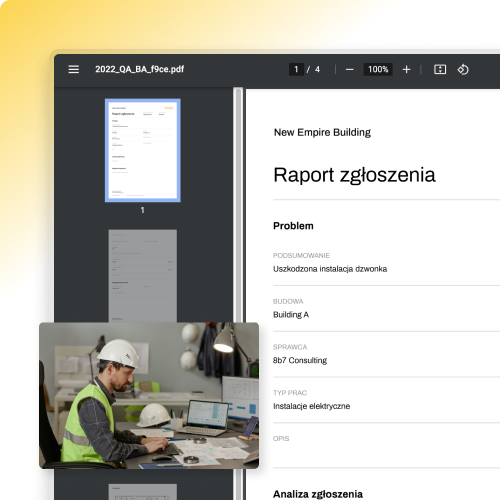
Automatic PDF and XLS defect reports
Individual and summary reports generated in one click. An XLS export with advanced filtering lets you analyse data by contractor, area or status — without hours spent in Excel.
- PDF report from a single defect
- Summary PDF report across multiple defects
- XLS export with advanced filtering
- Configurable report layout and content
- Generated automatically — no desk work required
Smart filters and defect analytics
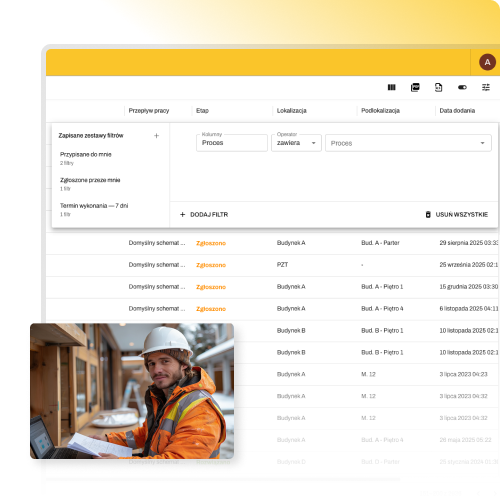
Filter defects by contractor, area, status and deadline. See each subcontractor's progress at a glance and spot recurring problems before they become a costly pattern.
- Filter by contractor, area and status
- Defect view on building floor plans
- Sort by deadline and priority
- Repair progress statistics and charts
- Identify recurring defect patterns
Companies that manage defects with Hustro

We've used the app on 66 projects, handling between 30 and 150 tickets on each

Thanks to intuitive reporting tools, we identified and eliminated non-conformances more quickly

Every defect goes automatically to the right contractor — with description, photos and location
Three categories, one system

Inspections & Handovers
Digital checklists, photo documentation and instant PDF reports — from site walkthrough to signed handover protocol in minutes.
Explore the inspections module →
Health & Safety Management
Digital safety inspections, incident reporting and automatic reports — H&S compliance without paper documentation. ISO 45001 and CDM-ready.
Explore the H&S module →
Document Management (CDE)
ISO 19650-compliant CDE platform — full version control and automatic document workflows across all approval zones. Always the latest version on site.
Explore the CDE platform →Hustro vs traditional methods
| Feature | Paper | Hustro | |
|---|---|---|---|
Defect registration on mobile |
|||
Photos pinned to floor plans |
|||
Real-time status tracking |
|||
Automatic subcontractor notifications |
|||
Deadline tracking & alerts |
|||
Automatic PDF & XLS reports |
|||
Full communication history per defect |
|||
Works offline on site |
Frequently asked questions
What is defect and issue management software?
How quickly can a defect be registered in Hustro?
Do subcontractors need a Hustro account to receive defect notifications?
What types of issues can be managed in Hustro?
Can defects be pinned to floor plans and drawings?
Does Hustro work offline on construction sites?
How quickly can Hustro be deployed on a construction site?
How much does Hustro defect management software cost?
Start managing defects
without the chaos
Book a free demo and see how Hustro helps you register, assign and track defects across your construction sites — from mobile, in real time, online and offline.
Book a demo
Our team will get back to you within 24 hours

Tomasz Jones
Digitalisation Specialist