
Property management
Property and facility maintenance management app
Tenant defect reports, repair orders, technical inspections, equipment service and building documentation – in one app. For managers of office buildings, warehouses, retail and service properties.
Trusted by: Hermes Fulfilment, Josera, AWM Budownictwo, Hybryd16

For the whole building team
Managers, service teams and tenants work on one list of issues
Running a building means hundreds of small matters: breakdowns, inspections, warranty repairs and tenant questions. Hustro organises them in one place – from report to close-out.

01
Property and facility managers
- All properties and issues in one view
- Repair priorities and deadlines under control
- Reports for the property owner in one click

02
Technical teams and service companies
- Orders with a description, photo and location on the plan
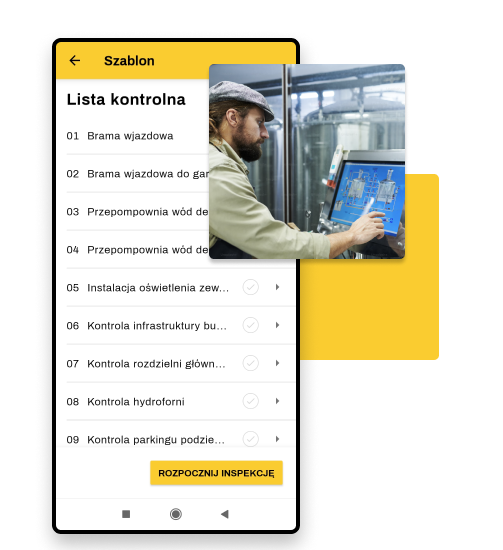
- Inspections and equipment service using checklists
- Equipment documentation and manuals on the phone

03
Tenants and building users
- Report a defect through a form – no login
- Updates on the repair status
- Faster response to breakdowns
Industry challenges
You manage properties. Do these everyday problems sound familiar?
Reports
Defects reported by email, phone and chat
A tenant emails, reception calls, someone posts a photo on WhatsApp. Some reports get lost along the way, and the rest come back as reminders.
Work orders
You don’t know if the technician got there
To check a repair status you call the service company. You hear “we’ll be there tomorrow” for the third time, and the tenant is still waiting.
Inspections
Inspection dates in one person’s calendar
One person tracks equipment and installation inspections in Excel. When they’re on holiday, deadlines slip and reports have to be recreated.
Documentation
Manuals and reports have to be hunted down
As-built documents on a drive, manuals in binders, reports in emails. The technician on site can’t access any of them.
Reporting
A report for the owner takes half a day
You collect data from emails and spreadsheets to show how many issues there were and what was fixed. The report is out of date the day it’s sent.
Tenants
Tenants run out of patience
Nobody tells them what’s happening with their report. An unhappy tenant is a risk of a lease not being renewed – and a vacancy.
From a tenant’s report
to a closed work order.
One app for maintaining office buildings, warehouses and retail properties.
How Hustro works
One tool for the whole issue lifecycle – from defect to report
01ReportA tenant or employee reports a defect in 30 seconds
Through a form with no login or in the app: photo, description and location on the building plan. The report lands on a shared list, not in someone’s inbox.
02AssignmentThe coordinator sets a priority and assigns a contractor
In one click you pass the issue to maintenance staff, a service company or an installer – with a deadline. The contractor is notified by email.
03ExecutionRepair status visible in real time
The contractor updates the status in the app or by email. Reminders before the deadline and a list of overdue orders – no phone calls.
04Sign-offVerifying the repair and closing the issue
After the repair you approve the work based on photos or an on-site check, and the tenant is informed that the issue is closed.
05History and reportsFull building history and reports for the owner
Every repair, inspection and report stays with the building and the equipment. A PDF report for the owner takes a few clicks.
Information flow
How information flows through a building with Hustro
From a tenant’s report to the owner’s report – with no emails, calls or spreadsheets along the way.
Tenant or building user
Reports a defect with a photo via the form or the app.
Hustro issue list
Collects reports from all properties in one place.
Manager / coordinator
Sets a priority and deadline, assigns a contractor.
Service / contractor
Fixes the defect and updates the status – even by email.
Property owner
Gets a report on repairs and inspections in one click.
Solutions
Every building maintenance process in one system
Every report, work order and inspection is managed in the same place – with the building’s full history.
Use cases
Properties where Hustro works
From a single building to a portfolio across many locations – each property has its own space with documentation, issues and team.
Industrial and warehouse properties
Large warehouses, logistics centres and factories – installation service, inspections and defects after handover.
Office buildings and coworking
Tenant requests, common-area maintenance and building installation service.
Retail properties
Shopping centres, arcades, showrooms and store chains – one list of issues for many locations.
Hotels and service properties
Fast response to breakdowns in rooms and common areas, repair history for every space.
Case studies
Case studies: facility maintenance and service
Warehouse and factory maintenance, warranty service and issue handling – see how they work with Hustro.

Hermes Fulfilment: building and maintaining a logistics centre
Hermes uses Hustro both during construction and in the day-to-day operation of its centre in Konin Żagański – for defect reporting and facility service.
“The platform has also become an invaluable tool in the day-to-day servicing of the facility, helping our team maintain a high standard of the building.”
 Tomasz KlimczakManaging Director, Hermes Fulfilment




Why Hustro
Benefits for property management companies
Hustro organises facility maintenance so your technical team spends its time on repairs, not on chasing information.
Book a demoTime and money saved
Your team spends less time collecting defect information, and ordering and accepting repairs is cut to a minimum.
Efficient management
Organised reports make it easier to report, issue work orders and plan preventive actions.
Business security
Timeliness and clear communication with contractors. In a dispute, all information is in one place.
Many properties, one system
Each property has its own space, and one view shows the status of every building.
Happy tenants
Tenants report a defect in seconds and know when it will be fixed.
Technical history of the building
The full service and repair history stays in the system – even when the service company changes.
All properties.
One view.
Reports, work orders and inspections from your whole portfolio – in real time.
Implementation
Implementation – as easy as 1-2-3
STEP 1
Free demo and consultation
- Analysis of your needs
- Presentation of the app’s capabilities
- Answers to all your questions
STEP 2
14-day unlimited trial
- We configure your properties and issue structure
- We train your team
- Full technical support
STEP 3
Decision
- You see concrete results
- You compare before and after
- You sign the contract – or say thank you
Knowledge
Read more about defect management
FAQ
Frequently asked questions
How does Hustro improve defect reporting in a property?
Any building user – resident, office worker or tenant – can report a defect from a phone in seconds, also through the service request form without logging in. The report goes automatically to the person responsible, with a notification.
Does Hustro replace Excel spreadsheets for tracking defects?
Yes. Hustro replaces Excel and emails with one list of issues that can be filtered, searched and assigned to a specific person or service company. Each issue has a change history, photos and a status visible in real time.
How does Hustro help manage equipment and installation service?
Hustro lets you keep a register of equipment and installations with their service history. You can set reminders for recurring inspections, document every intervention and access the building’s full technical history in seconds.
Do service companies and contractors need a Hustro account?
No. Contractors and service companies receive orders by email and can update statuses without logging in. If they want to use the mobile app, access is free.
Can I manage several properties at once?
Yes. Hustro handles many properties in parallel – from a single building to complex portfolios. Each property has its own space with documentation, issues and team, and one view gives you the status of all of them.
How does Hustro help meet repair deadlines?
Every work order has an owner and a deadline. The system sends automatic reminders before the deadline, and overdue orders are visible immediately.
Where is the buildings’ technical documentation stored?
Technical documentation, equipment manuals and inspection reports are stored in Hustro with the specific building or equipment (document management). Every authorised employee can access them from a phone.
Does Hustro generate inspection and service reports?
Yes. PDF reports of technical inspections, defect lists and service histories are generated automatically – ready to send to the property owner, the homeowners’ association or a tenant.
How long does it take to implement Hustro in a property management company?
In small and mid-sized companies implementation usually takes about a week. A consultant configures your properties, issue structure and permissions, and you start with a 14-day unlimited trial.
Is data in Hustro secure and GDPR-compliant?
Yes. Data is encrypted in transit and at rest, and servers are located in the EU. The system is GDPR-compliant, makes regular backups and lets you manage permissions precisely – each user sees only the properties they have access to.
Try Hustro on your project
Our consultants will help you plan the rollout and train your team. We will show you how property managers and technical teams work with Hustro.
Book a demo
Our team will contact you within 24h

Tomasz Jones
Digitalisation Specialist